“I would rather wait at the stop than miss the last connecting bus again.” This invented interview remark speaks to both waiting and the reason someone changed their departure time. Copy it into two documents and a later correction can leave one copy out of date. Taguette lets two tags point to one passage in the transcript. When it is time to write, quotations can be brought together by question while retaining the document they came from.[1][3]
Decide where the transcripts belong
Taguette is an open-source qualitative annotation tool distributed under the BSD three-clause license. For individual work, install it locally and leave its terminal running while using the browser interface. For collaboration, use the project's free hosted service or a server run by your team. Two installations with the same project name are separate projects. Decide which service may hold the original material under the consent given for the interviews.[1][2][4]
Create a project with a title and description, then add one document at a time under Documents. The guide lists PDF, DOCX, TXT, ODT, Markdown and HTML. Give each interview an identifiable display name and use its description to record the round of interviewing. The right pane shows the text around a quotation. The left pane switches between documents and tags. Keeping the round in the name is more reliable than trying to identify a session later by a familiar-sounding sentence.[3]
Attach two readings to one passage
Select the remark about the connecting bus, start a highlight and choose existing tags or create one. Our example uses both travel.waiting and travel.missed-connection. Give each tag a description stating which expressions belong there. When another interviewee says they waited indoors for the rain to stop, the description will help the team decide whether that belongs with waiting at a bus stop.[3] When coders disagree, each can return to that same highlight and read the surrounding sentences before interpreting it.
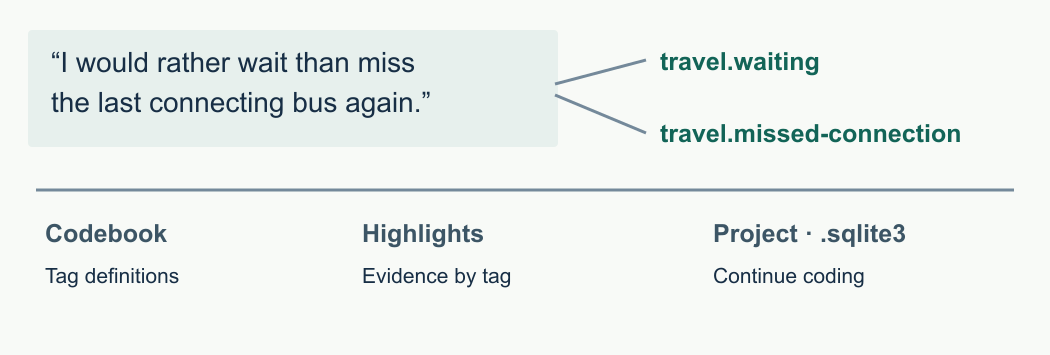
Figure: Two codes attached to one interview passage.
The guide uses punctuation to organize a hierarchy. Selecting a child tag retrieves that branch, while selecting its parent also includes its subtags. If two coders created near synonyms, inspect excerpts under each before merging. Open the tag that should disappear, choose Merge and select the tag to retain. The first tag's highlights move to the destination. Direction matters when deciding which term will appear in the final codebook.[3]
Choose the export for the recipient
For a discussion of coding definitions, export the codebook from project information. A spreadsheet supports line-by-line comments. QDC is the REFI-QDA option for exchanging code definitions. If a supervisor asks which quotations support an interpretation, open the corresponding tag and export its highlights view instead. The recipient can discuss actual words with their document associations rather than trying to reconstruct evidence from a list of labels.[3]
To hand over continued coding, export the whole project as a SQLite3 file. The recipient imports it from their own Taguette welcome page. It contains the documents, highlights and codes, so transfer it under the same access conditions as the original interviews. To show how just one document was coded, export that document's highlighted view instead. Distinguishing a codebook, supporting quotations and a working project preserves the trail back to the same passage.[3]