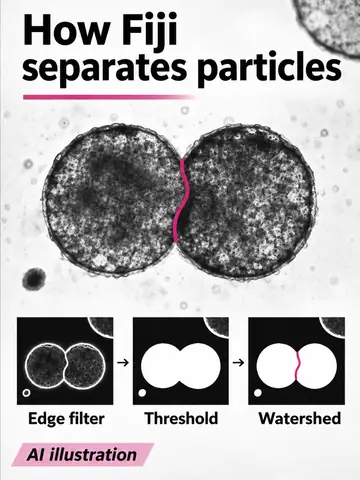
Do five disks in a field necessarily count as five particles? In this synthetic field, two overlap, one is clipped by the left border, and one is a small spot. Joining foreground pixels with their four immediate neighbours gives four components. Excluding border objects and spots smaller than 100 pixels in area leaves two. A publishable count needs a description of what qualifies as a particle. Several common Fiji commands implement different parts of that decision.[3]
Give the area a physical unit
Fiji is an ImageJ distribution bundling image-analysis plugins for major desktop platforms. Fiji is released under the GNU General Public License; its ImageJ2 core uses the two-clause BSD license, and components have their own licenses. The project lists Java 21 and Java 8 paths for Latest and Stable respectively. Consider existing plugins and analysis scripts when choosing which build the laboratory will use.[1]
Draw a straight line along a scale bar or a calibration image acquired under the same conditions. Open Analyze, Set Scale. The line gives the pixel distance; enter its known physical length and unit. If 100 pixels span 50 micrometres, one pixel measures half a micrometre on each side and covers one quarter of a square micrometre. A threshold of 100 pixels in area differs from 100 square micrometres. Global calibration is appropriate only for other images using the same spatial settings.[2]
Look at the mask before separating objects
Apply a manual or automatic intensity threshold to distinguish foreground from background. Compare the preview with a small region of the original. Is a faint rim disappearing? Are background spots being included? The resulting binary mask determines pixel connectivity. If two disks touch in that mask, accurate spatial calibration alone cannot separate them.[3]
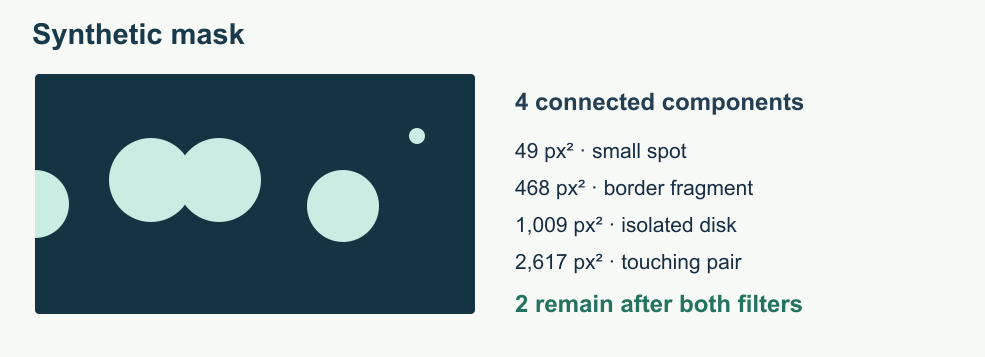
Figure: Synthetic particles used to compare counting rules.
For approximately round particles with a modest area of contact, try Process, Binary, Watershed. The division depends on distances inside the foreground to its boundary, so inspect the resulting cut. Separating the touching disks may suit a count of individuals. Keeping them joined may make sense when measuring aggregate area. Preserve both masks so a disputed pair can be revisited.[3]
Read the outlines alongside the table
In Analyze Particles, set size and circularity ranges. Circularity near one favours round objects: it may remove elongated debris and also genuine elliptical particles. Request outlines, individual measurements and a summary. Compare each outline with the original before interpreting a row of numbers. Excluding edge objects removes our clipped disk. The little spot has area 49 pixels and fails a minimum of 100. Record these two rules separately.[3] The isolated disk occupies 1,009 pixels and the joined pair 2,617. A summary count of two could be mistaken for two original disks. Connecting the areas to their outlines makes the joined object visible.
For a small field with ambiguous boundaries, use the built-in multipoint tool and compare manually marked locations with automatic outlines. Nucleus Counter combines thresholding, watershed and size filters for a common nucleus-counting workflow and can return counts and a labelled image. For a batch of fields, retain each field's outlines and results. A different magnification or background is a reason to recheck calibration and segmentation before combining counts.[3]