Scite’s September feature update, published on 6 October 2026, adds four tools to Scite MCP—citation evidence, page-by-page full-text reading, formatted bibliographies, and citation screening records—and ships Markdown notes plus public share links in Collections. Based on the official release notes and MCP page, this article explains how to verify citation context in ChatGPT, Claude, and Copilot.
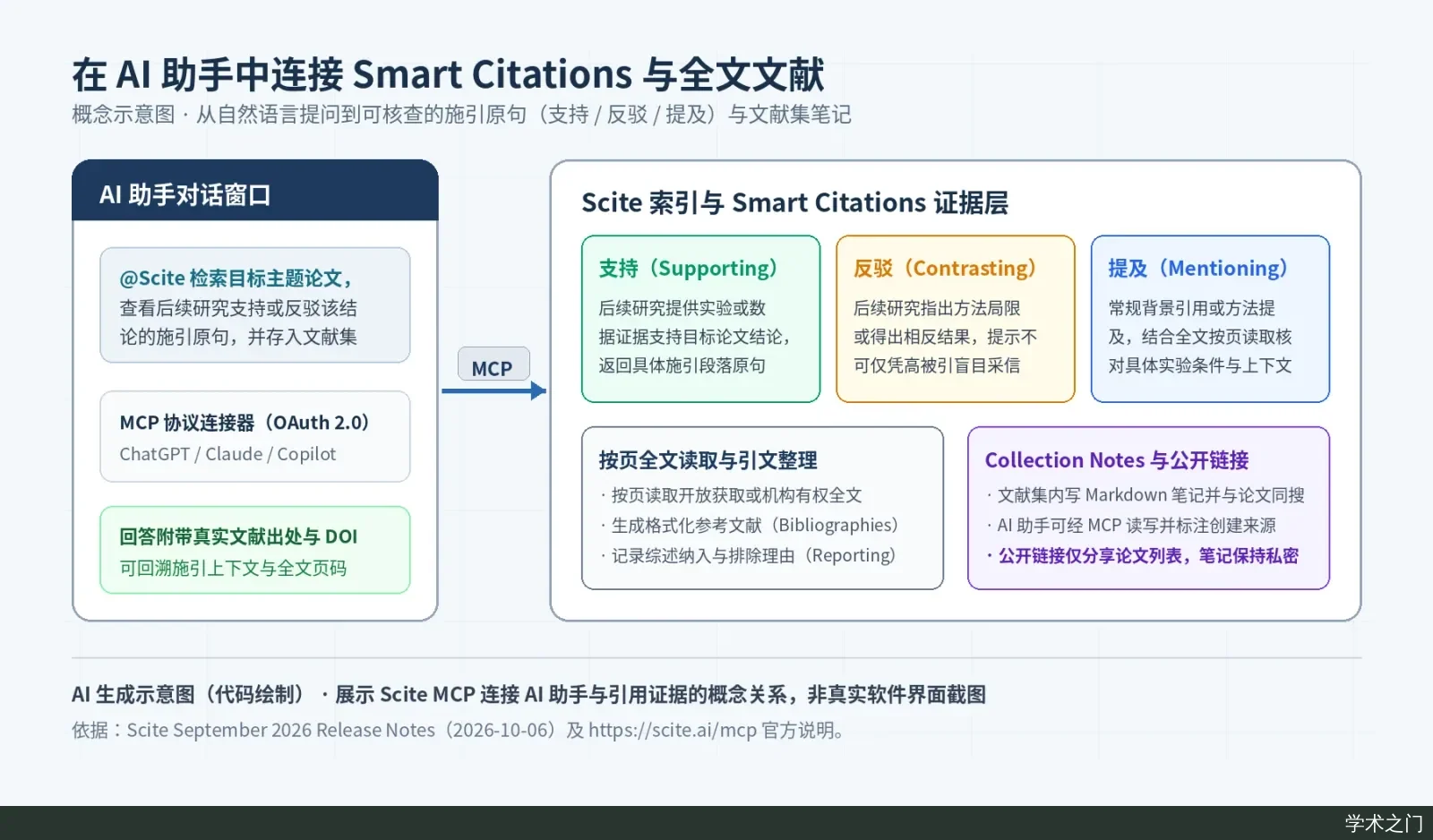
AI-generated schematic (drawn in code): conceptual links among supporting, contrasting, and mentioning citation evidence and collection notes as an AI assistant calls Scite MCP—not a real Scite software screenshot.
What problem it solves: from open indexes to citation context
This site has previously covered Semantic Scholar, The Lens, and OpenAlex, which emphasize open scholarly indexes, bibliographic coverage, or paper–patent citation links. In day-to-day research, though, asking a general AI assistant about literature often raises another problem—the assistant may fluently summarize findings yet lack checkable real sources, or name a highly cited paper without saying whether later work supports or contests its core claims.[1][2]
Scite’s core mechanism is Smart Citations: it extracts the citing sentence from full-text literature and classifies the citation relation as supporting, contrasting, or mentioning. Scite MCP is a Model Context Protocol connector that links ChatGPT, Claude, Microsoft Copilot, and other MCP-compatible AI clients directly into Scite’s index and full-text corpus. Compared with searching only on the scite.ai web site, Scite MCP focuses on “sourced literature discovery and citation checking” inside the conversation workflow, so assistant answers rest on traceable papers and citing sentences.[1][2]
Per Scite’s official pages, Scite is part of Research Solutions and has indexed more than 1.6 billion citation statements, working with 44+ publishers; as of a check on 27 October 2026, the live counter on scite.ai/mcp showed more than 30.17 million cumulative calls.[1][2] On publisher content, Research Solutions and open-access publisher MDPI issued a joint press release on 6 October 2026 announcing that, through Scite Publisher Gateway, full text from 500+ MDPI open-access journals would enter Scite and Scite MCP, so AI tools can return citation context while linking back to the Version of Record.[3]
Four new MCP tools and collection collaboration
Scite’s September 2026 Release Notes, published 6 October 2026, center the update on “embedding Scite more deeply in researchers’ AI workflows.” On the MCP side, four tool classes extend assistants from paper search alone to evidence checking and review organization around literature:[1]
- Citation evidence: see how a target paper is cited in later literature—not only supporting, contrasting, and mentioning classifications, but the concrete original citing sentences for each statement, so you can check in chat whether a claim was later challenged experimentally.[1]
- Full-text reading: for papers with permissively licensed open access, or literature your institution already has Holdings access to, read full text page by page in the AI assistant to check experimental conditions, sample sizes, or methods details missing from the abstract.[1]
- Bibliographies: generate formatted citation entries from searched or verified literature for pasting into a manuscript reference list.[1]
- Citation reporting: while searching and reading, record which sources were included or excluded and why—directly serving transparent screening logs in the systematic-review literature stage.[1]
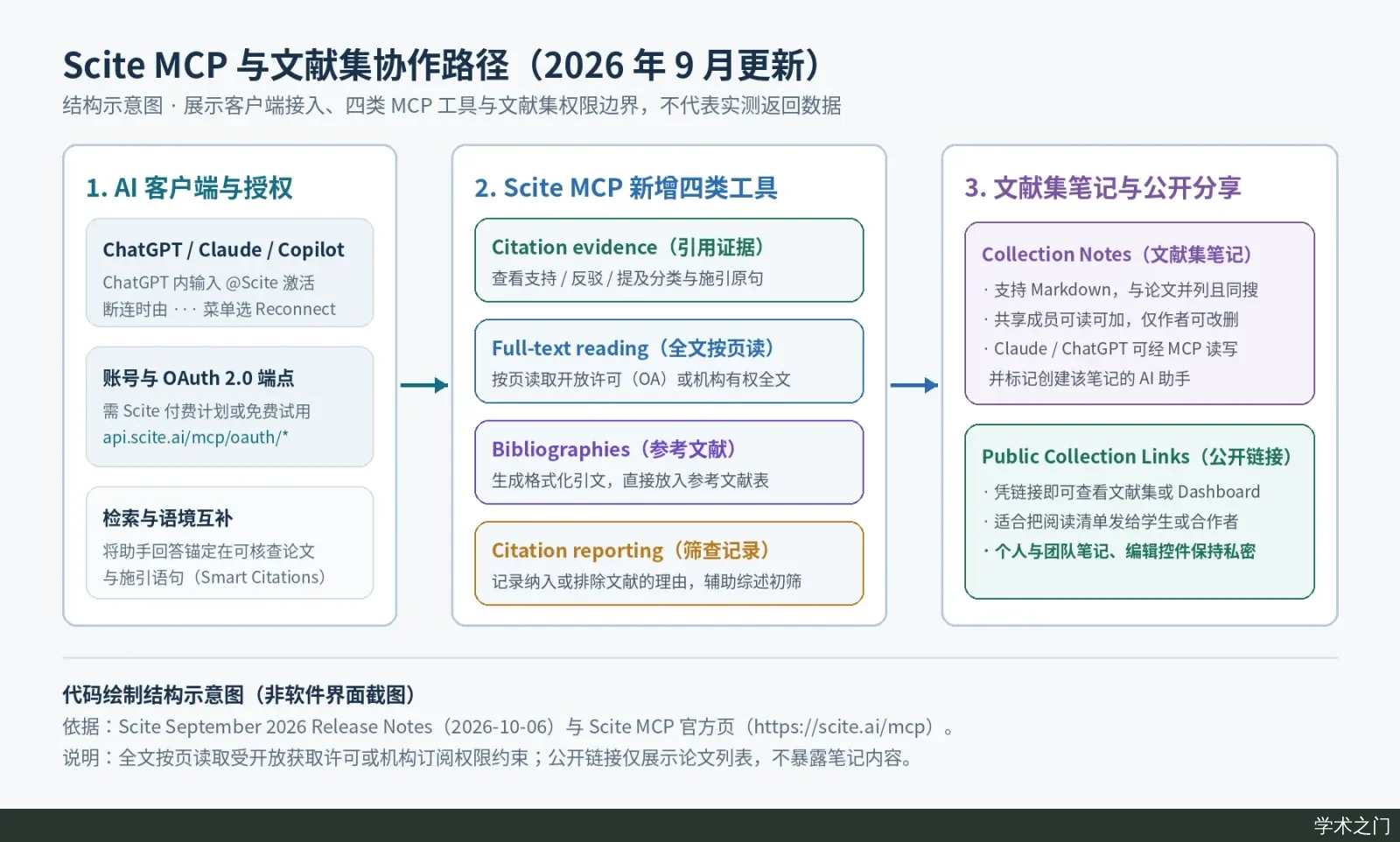
Code-drawn structure schematic: client access, four MCP tool classes, and collection sharing permission paths distilled from Scite’s September 2026 release notes and the official MCP page (AI-generated schematic).
Alongside MCP tools, the September update upgrades Collections’ recording and external sharing so reading done in AI assistants can settle into a personal or team knowledge base:[1]
- Collection Notes: researchers can now write notes inside a collection. Notes sit next to the papers they cover, support Markdown, and are searchable with those papers, so abstracts, open questions, and reading memos stay bound to the evidence. On collaboration, colleagues on a shared collection can read and add notes, but each note can be edited or deleted only by its creator. Claude, ChatGPT, and similar assistants can also read and save notes in a collection via Scite MCP, and each note clearly marks which AI assistant created it.[1]
- Public Collection Links: any collection or analysis Dashboard can get a public share link; anyone with the link can view the paper list—handy for assigning student readings or giving collaborators and reviewers a topic bibliography. On privacy, public links show only the paper list, never notes or editing controls; existing team shared collections are unchanged, and team members can still view and add notes together.[1]
Client setup steps, examples, and usage limits
Scope and prerequisites: the following follows Scite’s September 2026 release notes (published 2026-10-06) and the Scite MCP landing page (https://scite.ai/mcp, consulted 2026-10-27). Connecting Scite MCP requires an active Scite paid plan or free trial (the official MCP page does not list subscription prices; see the Pricing page). Configuration parameters and prompt examples below are distilled from official docs and do not mean this round ran live calls.[1][2]
Client configuration and call steps (ChatGPT example):[2]
- Configure: visit scite.ai/mcp[2] and choose the ChatGPT, Claude, or Copilot entry for your client (the page also links to the ChatGPT app page, Claude connector directory, and Microsoft Marketplace).
- Authenticate: after launching the app, follow the client prompt to log in and authorize your Scite account.
- Use & Reconnect: type
@Scitein the chat to activate the connector. Official troubleshooting especially notes that ChatGPT may silently drop external tool connections between sessions; if Scite does not respond, or for stable retrieval every time, before a new session click the···menu beside Scite in the chat UI and chooseReconnect.[2]
Manual OAuth 2.0 endpoints and prompt examples:
Most MCP-compatible clients can auto-discover auth config at https://api.scite.ai/.well-known/oauth-authorization-server. For manual wiring in a custom OAuth 2.0 client (e.g. a Power Apps custom connector), official public endpoints and prompt examples follow (for configuration checking only—not executed):[2]
Authorization URL: https://api.scite.ai/mcp/oauth/authorize
Token URL:         https://api.scite.ai/mcp/oauth/token
Refresh URL:       https://api.scite.ai/mcp/oauth/token (POST grant_type=refresh_token)
Registration URL:  https://api.scite.ai/mcp/oauth/register
Scope:             mcp

# Official ChatGPT prompt example to activate the connector:
@Scite find papers on CRISPR gene editing
Verification results and usage limits: This round’s verification is source checking: official release notes, MCP setup pages, and the publisher collaboration press release were compared to their original text; no trial or paid account was opened for live client calls. In real scholarly search, keep four boundaries in mind:[1][2]
- Not a substitute for systematic database search strategy: Scite MCP’s strength is citation checking, page-level close reading, and note capture during conversation; features overlap the web UI but do not replace Boolean query retention, multi-database deduplication, and reproducible search snapshots needed for formal literature reviews.
- Full-text reading is strictly limited by open licenses and institutional subscriptions:
Full-text readingapplies only to open-access (OA) licensed papers or content your institution already subscribes to (Holdings); for paywalled papers without full-text rights, Scite’s publisher-gateway design gives AI only Smart Citations citing sentences and version-trace links—it does not break copyright to supply full text.[1][2] - AI summaries can still drift; check citing sentences: even when answers rest on Smart Citations, general models may simplify experimental premises or misread methods context when synthesizing supporting or contrasting evidence; before citing, verify via citing sentences from
Citation evidenceand the source paper body. - Silent disconnect across sessions: as official troubleshooting notes, some AI clients silently drop connectors when switching sessions; if the tool did not actually fire, the assistant may fall back to pretrained parameters alone—check that outputs carry real Scite citation links and note-creation marks.[1][2]
References
-
[1] Scite. September 2026 Release Notes. Published: 2026-10-06; consulted 2026-10-27.
-
[2] Scite. Scite MCP - Connect Your AI to Scientific Literature. Page has no separate publication date; consulted 2026-10-27.
-
[3] Research Solutions, Inc. & MDPI. Research Solutions' Scite & MDPI Collaborate To Make Open Access Research Discoverable, Attributed, & Measurable Inside AI Tools. Published: 2026-10-06; consulted 2026-10-27.
-
Academic Gateway · a living guide for scholars in the intelligent age
-
Information compiled and published by the Scholay academic one-stop platform; report infringement for takedown.
-
Also published on Enter Scholar, a scholars’ community for the intelligent age