Project overview
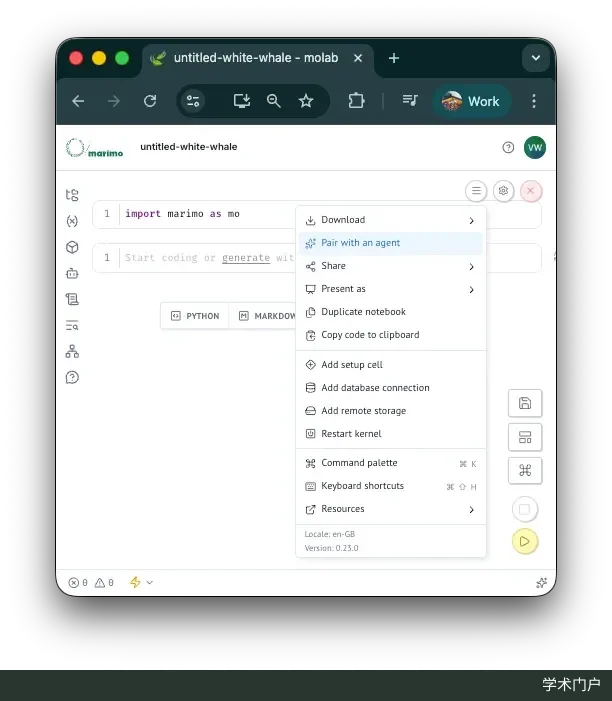
marimo is an open-source reactive Python notebook: after you run a cell, cells that depend on it automatically re-run or are marked stale; notebooks are stored as ordinary .py files and can run as scripts or be deployed as web apps. Version 0.25.1 was released on 1 October 2026 (UTC), improving the AI agent pairing entry point, adding cache manifests and cache management commands, and fixing sandbox environment issues among others. This article is source verification; we did not install or test hands-on.
Project positioning and basic usage
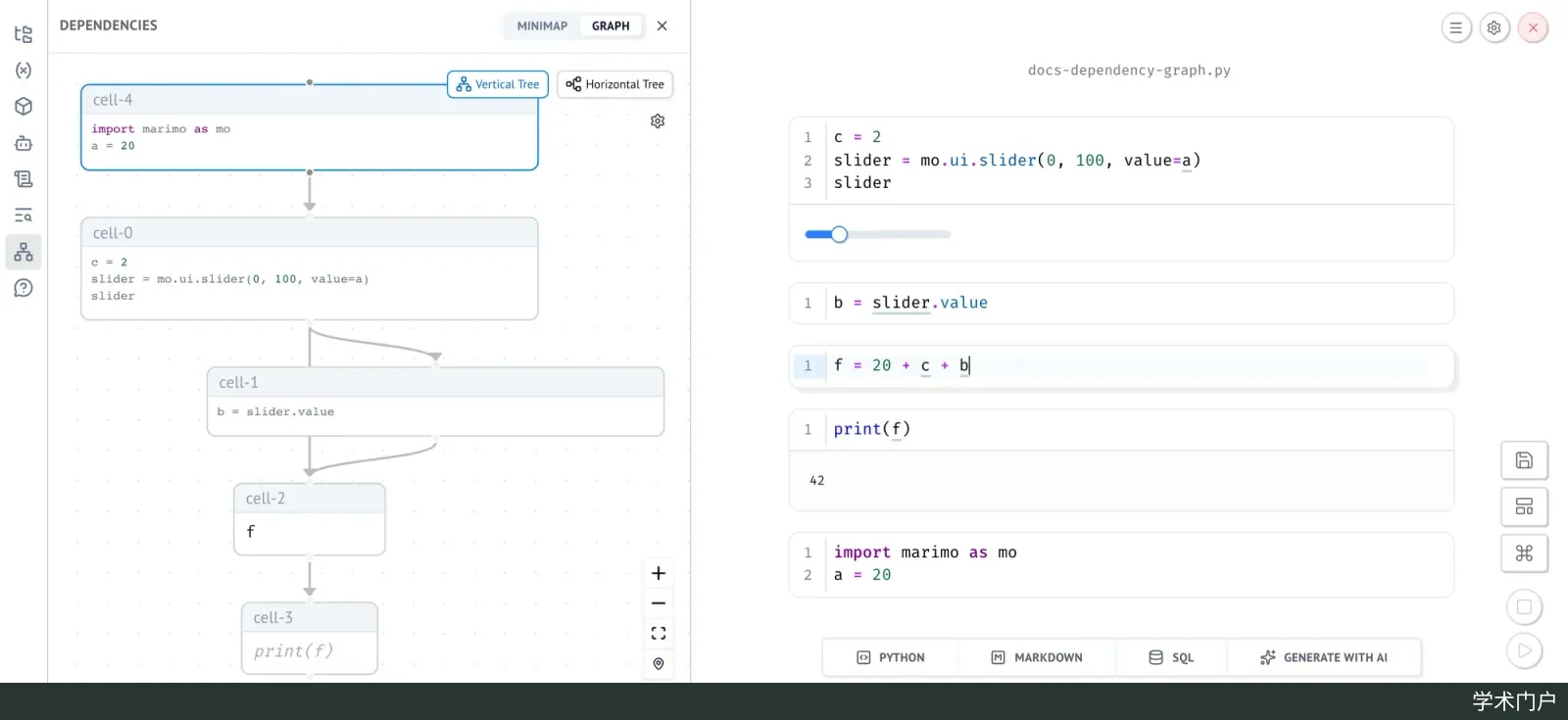
- What it is: marimo is an open-source reactive Python notebook. Without running code, it statically analyzes which globals each cell reads and defines and builds a dependency graph among cells; after you run a cell, other cells that reference its variables re-run automatically. Execution order is determined by variable references, not by position on the page; deleting a cell also clears the variables it defined from memory.[5,7]
- Files and ways to run: Notebooks save as ordinary
.pyfiles, work with Git, can run as scripts viapython your_notebook.py, or deploy as code-hidden web apps withmarimo run. They also support SQL cells, interactive controls such as sliders and tables, HTML export, and running in the browser via WebAssembly. Existing Jupyter files can be converted withmarimo convert.[5] - AI collaboration: Official docs recommend
marimo pairto connect coding agents such as Claude Code, Codex, and OpenCode to a running notebook; the agent can read variables, test logic in a draft area, run and add/remove cells, and operate UI controls. The editor also has a built-in AI assistant that can use your own API keys or local models.[5,9] - Install and license: Install with
pip install marimoorconda install -c conda-forge marimo; PyPI shows 0.25.1 requires Python 3.10 or newer. The repository is marimo-team/marimo at https://github.com/marimo-team/marimo[3], under Apache License 2.0. As of 21 October 2026 the repo had about 23,000 stars; the README calls it a NumFOCUS-affiliated project.[3,4,5,6]
What’s new in 0.25.1
0.25.1 was published on GitHub Releases on 1 October 2026 (UTC), with the package uploaded to PyPI the same day. This release is mainly small enhancements and bug fixes; key items:[1,6]
- Agent collaboration: The local agent pairing entry is easier to find;
ctx.edit_cellandctx.create_cellgained anexpand_outputsparameter; the catalog of optional large models for built-in AI features was updated. The release notes list items without expanding usage.[1] - Cache records and management: Cache entries are now recorded per notebook in their own manifests, with two new commands:
marimo cache sizeandmarimo cache dir. marimo already provided cache decorators such asmo.cache(in memory, lost on restart) andmo.persistent_cache(on disk, kept across runs but using disk space); repeated calls with the same arguments read from cache. Exact parameters for the new commands follow official docs and command help.[1,8] - Security and environment fixes: Input via
getpass(for example passwords) is no longer written into saved console output; sandbox selection logic was hardened and the package manager used by the sandbox was fixed in install prompts; language-server websocket listening was hardened; kernel SIGINT handling was made reentrant-safe; editing sandboxed URLs no longer repeatedly prompts for Docker.[1] - Other fixes: Plotly hover text display glitches; inability to plot when data falls back to CSV and column names contain dots; radio-button misalignment when option text wraps; overwriting existing settings when partially updating cell config; and more.[1]
- Later versions: As of 21 October 2026 the latest release was 0.25.2 from 19 October 2026 (UTC). That version added Python 3.15 support and GeoJSON/GeoParquet export, and fixed agents editing and running a cell without executing pending dependent cells; it also includes a breaking change: dark theme no longer automatically switches matplotlib, Plotly, and similar charts to dark—plotting libraries’ own settings are used instead.[2]
Why they help
For research users, marimo mainly targets messy execution order, leftover hidden state, and hard-to-reproduce results in traditional notebooks. It suits Python data cleaning, statistical analysis, and visualization when the analysis process needs version control or sharing with collaborators. The following is based on the official README, docs, release notes, and PyPI—source verification, not a hands-on install.
Suitable use cases
- Keep results consistent with code: For example, change an outlier threshold from 3× SD to 2.5×; statistical tests and chart cells that reference that threshold re-run automatically, avoiding “the plot used old parameters while the table used new ones.” Slow cells can switch to lazy mode and only be marked stale until you run them manually.[5,7]
- Version control and code review:
.pyfiles can be diffed in Git; functions and classes in one notebook can be imported by another and tested with pytest.[5] - Parameterized batch runs: The same notebook can run as a script from the command line with different settings via CLI arguments—useful for repeating the same analysis on many datasets on a server.[5]
- Show work to collaborators or students: Deploy as a code-hidden interactive web app or slides, or run in the browser via WebAssembly—good for group meetings, class demos, and sharing results.[5]
- Reduce repeated computation: Use
mo.persistent_cacheon slow functions such as model embeddings or numerical simulations so identical-argument calls after restart read from disk; 0.25.1’s cache manifests and commands help manage those caches.[1,8] - Collaborate with AI coding assistants: Through
marimo pair, a local agent can read variables in the running notebook and run cells, checking code against real data rather than only reading source text.[9]
Limits and cautions
- Not hands-on tested: This article is source verification without install testing; content comes from GitHub Releases, the repository page, LICENSE, README, official docs, and PyPI.
- Writing style differs from Jupyter: Each global variable may be defined by only one cell; marimo also does not track in-place object mutation—running
df["new"] = ...ormy_list.append(...)in another cell will not trigger downstream re-runs. Official guidance is to mutate in the same cell that defines the variable, or create a new variable. Users who habitually rewrite the same variable across cells need to adjust; migrating old notebooks should be checked against this rule.[7] - Slow or side-effectful cells need control: Auto re-run can unexpectedly trigger long computation or file writes; official guidance is to set runtime to lazy mode, or use
mo.stop, disable cells, and similar controls.[7] - Caching has costs:
mo.persistent_cachepersists across runs but uses disk;mo.cacheis faster but lost on restart.[8] - Agent features have prerequisites: Letting an agent receive notebook messages requires conditions—for example Claude Code and OpenCode need to run on macOS or Linux; once connected, the agent can execute code in the kernel, so confirm which data and credentials it can reach. In 0.25.2 release notes, some
marimo pairconnection improvements are still listed under “preview features.”[2,9] - Frequent releases: 0.25.2 arrived less than three weeks after 0.25.1 and includes a breaking chart-theme change. Research projects should pin versions for reproducibility; marimo can embed dependencies in the notebook file and auto-install them in an isolated virtual environment.[2,5]
References
-
marimo-team/marimo. 0.25.1 (GitHub Releases, 2026-10-01). https://github.com/marimo-team/marimo/releases/tag/0.25.1 (accessed 2026-10-21)
-
marimo-team/marimo. 0.25.2 (GitHub Releases, 2026-10-19). https://github.com/marimo-team/marimo/releases/tag/0.25.2 (accessed 2026-10-21)
-
marimo-team/marimo (GitHub repository). https://github.com/marimo-team/marimo (accessed 2026-10-21)
-
marimo-team/marimo. LICENSE (GitHub repository license file). https://github.com/marimo-team/marimo/blob/main/LICENSE (accessed 2026-10-21)
-
marimo-team/marimo. README. https://github.com/marimo-team/marimo/blob/main/README.md (accessed 2026-10-21)
-
marimo 0.25.1 (PyPI project page). https://pypi.org/project/marimo/0.25.1/ (accessed 2026-10-21)
-
marimo docs. Running cells. https://docs.marimo.io/guides/reactivity/ (accessed 2026-10-21)
-
marimo docs. Caching. https://docs.marimo.io/api/caching/ (accessed 2026-10-21)
-
marimo docs. Collaborate with agents using marimo pair. https://docs.marimo.io/guides/generate_with_ai/marimo_pair/ (accessed 2026-10-21)
-
Information compiled and published by the Scholay academic one-stop platform; report infringement for takedown.
-
Also published on Enter Scholar, a scholars’ community for the intelligent age