On 24 September 2026, the U.S. National Library of Medicine (NLM) launched the experimental pilot Linked Discoveries™. Starting from one PubMed record that has an abstract, it builds a “literature neighborhood” of up to 200 related papers by semantic similarity; you can filter by disease, gene, and chemical topics, mark reviews, retractions, and NIH-funded papers, show within-neighborhood citations and a timeline, and export results as CSV or hand them back to PubMed.

AI-generated schematic: a literature neighborhood centered on a seed paper; node counts, colors, and layout are illustrative and do not match the real Linked Discoveries UI.
From keyword hits to a literature neighborhood
Keyword search answers “which papers mention these words.” When assessing a finding you also need something else: which nearby studies discuss the same question, which are reviews, which have been retracted, how they cite one another, and how the line evolved over time. NLM states this motivation on the tool home page: well-known or highly cited results tend to get too much attention, while conflicting, negative, or less visible results are easier to miss. Scite MCP, covered recently on this site, stresses citation context; Dimensions Analytics MCP stresses full-database research intelligence and APIs. Linked Discoveries starts from a different place—one concrete PubMed paper—and shows how surrounding evidence connects.
Per NLM, Linked Discoveries uses only data already in PubMed: titles, abstracts, keywords, and references, then brings in topic information from MedGen (diseases and genetic conditions), Gene (genes), and PubChem (chemicals and drugs) through NCBI’s Entrez linking system, covering more than 29 million PubMed records. Neighborhoods are built with a fine-tuned biomedical language model, BiomedBERT (formerly PubMedBERT): each record’s title, abstract, and keywords become a vector, and the system takes the records closest to the seed, so papers that use different wording but similar meaning can still be found. Disease, gene, chemical, citation, article-type, and funding labels are applied after the neighborhood is formed and do not decide which papers enter it; full text is not used in the computation.
Entering a neighborhood from a seed paper: browse, filter, export
The steps below match User Guide version 1.0 published 24 September 2026. There is one prerequisite: a qualifying PubMed record—an abstract, and a type that is original research, review, or related evidence. Open that record’s abstract page; on large screens find the “Linked Discoveries” button in the right sidebar, on small screens under the title. Click to open the tool in a new tab with that paper as the seed. Without a paper ready to hand, you can start from example seeds on the tool home page. The home page lists four, including van Asten et al. 2018 in Ophthalmology on genetic variants and phenotype associations in age-related macular degeneration, and Allende et al. 2025 in J Clin Invest on CNS-targeted base editing of a major late-onset Tay-Sachs mutation.
Once in a neighborhood, browse in this order:
- Know the seed and neighbors. The teal node labeled “Seed” is the seed paper; every other node is a PubMed record labeled with first author and year. The default view is the seed plus the 49 most similar records; display options above the graph can expand to 200, with newly added nodes appearing at the lower right. Nodes are roughly ordered left-to-right and top-to-bottom by similarity to the seed.
- Switch network and timeline. A control above the graph swaps the network for a timeline: the same nodes lined up by publication year, with a blue dashed line marking the seed’s year, so you can see when work in this direction started and when it densified.
- Filter by topic. Three drop-downs above the graph—condition, gene, chemical—allow multi-select across menus. “Any” shows papers matching at least one selected topic; “All” shows only papers matching every selected topic. Non-matching nodes are hidden; matching nodes keep position and gain small red (disease), green (gene), or teal (chemical) markers. “Active filters” lists current conditions; remove one with X or clear all with “Clear all.”
- Read color marks. Red nodes are retracted; light blue on the right of a node means funding from at least one of NIH’s 27 institutes and centers; gold on the lower half marks reviews, covering meta-analyses, scoping reviews, systematic reviews, guidelines, and consensus statements, based on MeSH publication types on the PubMed record. Larger halos mean more citations within this neighborhood.
- See citation links. Selecting a node draws solid blue lines to papers in the neighborhood that cite it (Cited by) and dashed blue lines to papers it cites (Cites); “Show All citation connections” shows mutual citation links for the whole neighborhood.
- Open details or change seed. The right-hand card shows PMID, title, authors, abstract, topics, and publication updates. Click a topic name on the card to filter by that topic; “View in [database]” jumps to the matching MedGen, Gene, or PubChem record; “Set as seed article” rebuilds a neighborhood in a new tab with that paper as seed.
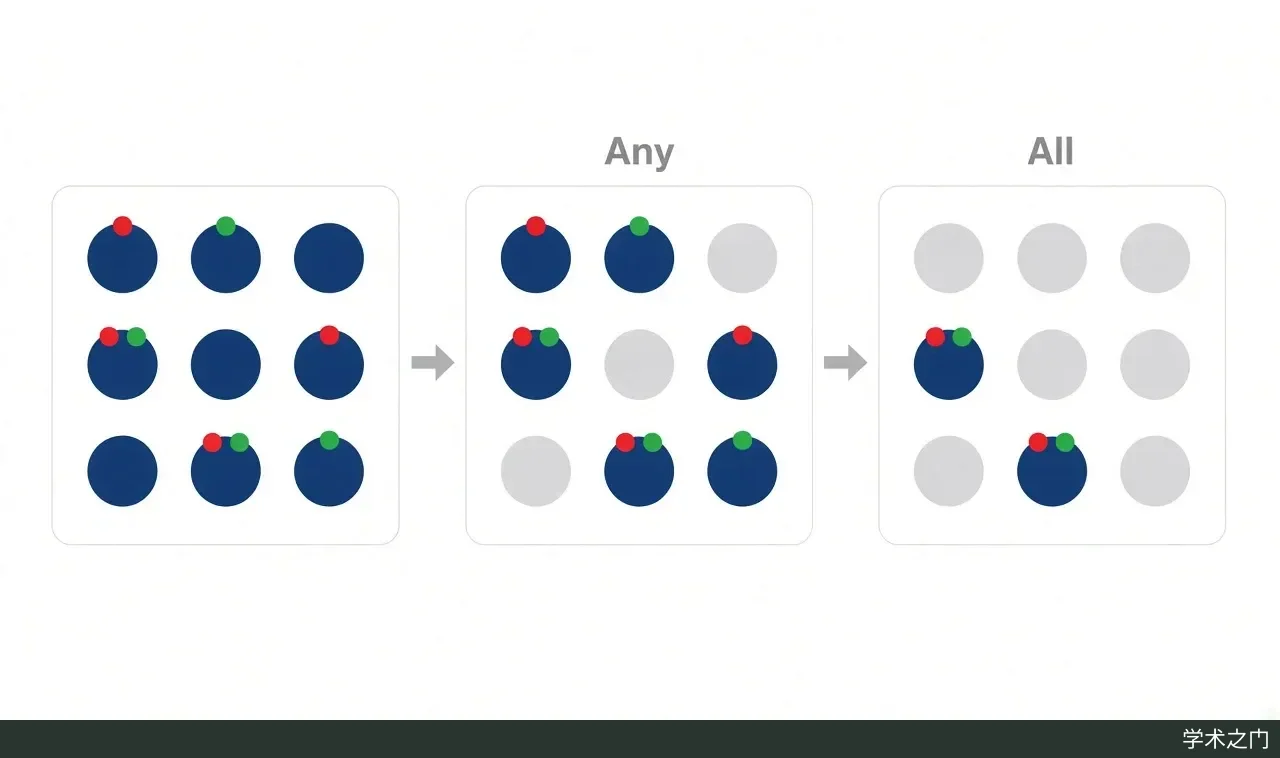
AI-generated schematic: Any keeps papers matching any selected topic; All keeps only papers matching all selected topics; node counts and positions are illustrative and do not match the real UI.
The two filter logics match different search intents. NCBI’s launch post gives examples: a clinician exploring a drug may need only one chemical filter; a researcher testing a hypothesis can select several topics and use “All” to see where they co-occur. When a neighborhood is too wide, the user guide suggests keeping only diseases, genes, or chemicals discussed in the seed itself, narrowing to what is truly related. Some topics are hierarchical: selecting a broader topic automatically includes narrower topics that appear in the neighborhood—for example a broad disease class also counts its subtypes present in the graph.
After you have a useful subset, there are two exits:
- Download CSV. Click “View in table” or scroll to the table under the graph. The table defaults to similarity to the seed and can sort by year. “Download CSV” above the table exports currently displayed records, one row each, with fields including PMID, title, authors (up to the first 100), journal, year, article type, publication updates, abstract, disease/gene/chemical labels, and Cited by / Cites relations. With filters applied, the file contains only visible records.
- Hand back to PubMed. “View all in PubMed” above the table opens the neighborhood as a result set in PubMed, filtered to matches when filters are on. You can then keep using PubMed sort and filters, the Results by Year timeline, Search history combinations, My NCBI Collections for long-term saving, or export to reference managers.
Inclusion scope, data lag, and pilot limits
Not every PubMed record can be a seed. Linked Discoveries includes only records that represent original research, reviews, and related evidence; biographies, interviews, and preprint records are out of scope, as are records without abstracts, because neighborhoods depend entirely on abstract text. Publication-update records such as errata, expressions of concern, comments, and retraction notices cannot be seeds, but they appear under “Publication Updates” on the card for the updated paper; when a paper is retracted, a red banner also appears at the top of the card. If an abstract page has no Linked Discoveries button, the official reason is that the record is outside that scope.
Data updates lag. New PubMed records enter Linked Discoveries daily, but the two systems update on different schedules, so a newly indexed paper may temporarily have no neighbors; disease, gene, and chemical labels depend on PubMed, MedGen, Gene, and PubChem indexing and can take up to a month to catch up. Missing labels do not mean the paper never discusses that topic; conversely, labels may come from database standard terms and related concepts that never appear as the original words in the abstract. Citation links likewise cover only citation data available in PubMed from publisher deposits and NCBI resources—not necessarily a complete citing list. Errors in bibliographic data such as title, authors, or abstract should be corrected with the journal publisher in PubMed; NLM currently does not change annotations on individual records.
Similarity is only a starting point for exploration. Neighborhoods come from a large, densely linked corpus, so similarity scores within a neighborhood are often very close; small rank differences do not mean one paper is clearly more related than another; two semantically close papers may still use different methods or reach opposite conclusions. Linked Discoveries is therefore best for quickly mapping surrounding evidence after reading a key paper: is there a review to read first, a retraction to exclude, which follow-ups cite it. For reproducible, reportable systematic searches, return to PubMed search strategies and established search workflows. It is still a prototype under development, with a yellow feedback button on every page; NLM says later versions will keep exploring new features, with later stages planned to support assessment of research reproducibility more directly.
References
-
NCBI Staff. A New Way to Explore Connections in Biomedical Literature. NCBI Insights, 2026-09-24.
-
National Library of Medicine. Linked Discoveries™ User Guide, Version 1.0. Last update: 2026-09-24.
-
National Library of Medicine. Linked Discoveries™: Explore the literature surrounding a PubMed® citation.
-
NLM Technical Bulletin. Introducing Linked Discoveries™!. 2026 Sep–Oct; Issue 472, 2026-09-24.
-
Academic Gateway · A life guide for scholars in the intelligent age
-
Information compiled and published by the Scholay academic one-stop platform; report infringement for takedown.
-
Also published on Enter Scholar, a scholars’ community for the intelligent age