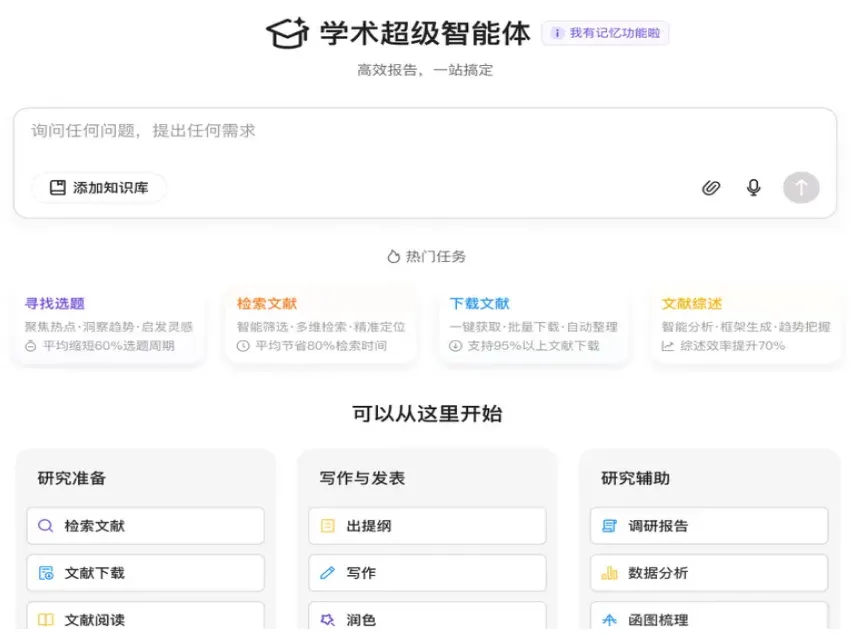
“Academic Super Agent” interface shown on the Qinyan Academic homepage, screenshot from 20 October 2026. Source: qinyanai.com.
Qinyan Academic (www.qinyanai.com) began as “Write While You Search,” launched in 2021, and was renamed Qinyan Academic in June 2025; the operator is Beijing Jiansheng Technology Co., Ltd. The site slogan is “one-stop intelligent academic research platform,” centered on an “Academic Super Agent”: describe a research need in one sentence, and the AI plans steps, retrieves literature, analyzes, and drafts content.
Main features
“Popular tasks” on the homepage show the intended span: find topics, search literature, download papers, and write reviews. AI topic selection suggests topics from a field and methods you enter, with references attached; literature search integrates multiple scholarly databases—official materials mention PubMed, Google Scholar, arXiv, Web of Science, CNKI, and Wanfang, with filters by SCI quartile and journal tags. Reading supports PDF, Word, and EPUB uploads, with chat beside the source text, figure/formula recognition, translation, summaries, term explanations, and excerpt notes. Writing features include citation suggestions, autocomplete, polishing/rewriting, and AI figure generation; the site claims support for more than ten thousand citation styles.
Strengths for writing workflows
Qinyan Academic keeps the “write while you search” specialty: Word and WPS plugins can match literature by keyword while you write, insert citations in one click, and build reference lists; a browser extension can pull records from publisher sites. That is practical for people who draft in Word and do not want a separate reference manager. The platform also supports shared group libraries and collaborative annotation.
Who it suits
It fits graduate students writing proposals, reviews, or theses, and small teams that need a shared lab library. Some university libraries already offer trials.
Getting started and cautions
Open www.qinyanai.com, click “Enter web version” to register, or download the Windows or Mac client. Per university trial notices, registration grants cloud storage and “Qin points”; topic selection, search, and knowledge-base features are free, while reading, Q&A, and writing deduct Qin points—see the official site for rules. The operator pledges encrypted storage of uploads and no use for model training. Agent-generated reviews and paragraphs are only draft references; every citation must be verified item by item, and check your institution’s AI-writing policy before use.
Academic Gateway will keep cataloging academic tools and sites in China and abroad. To put search, reading, writing, and pre-submission checks in one workflow, you can also look at Scholay.
Information compiled and published by the Scholay academic one-stop platform; report infringement for takedown.
Also published on Enter Scholar, a scholars’ community for the intelligent age