Thesis and journal drafting often means inserting in-text citations while writing and generating a formatted reference list. NoteExpress (inoteexpress.com) links collecting and organizing records to Word/WPS plugins: the built-in plugin inserts citations while you write in Microsoft Word or Kingsoft WPS Writer.[1][2] The v4.4.0.10876 release dated 25 September 2026 is available for Windows.[1][2] Purchase requirements list Windows 8 or 10 (32- or 64-bit) and Windows 11. macOS needs a Windows virtual machine or dual-boot setup. The 4.X documentation covers some older Windows releases, including Vista and 7. Check the installer’s requirements for the build you will use.[3][4] Listed writing tools include Word 2007–2019, Office 365, and WPS Office. The 4.X documentation additionally includes Word 2021. The plugin usually installs with the main program.[3][4]
Create a library, then collect records
The wiki suggests the first launch opens a sample library under Documents for practice; for real use, create a new database, choose its path, and add folders as needed.[4] Collection routes include file import, the browser capture tool (网络捕手), online search, and transfer from other managers or formatted files.[4] Once records are in the library you can dedupe and complete fields before the Word/WPS plugin uses them.[4]
Insert citations and switch styles in Word or WPS
Place the cursor where the in-text citation should go → select the record in the NoteExpress main window → click Cite in the main program or Insert citation in the plugin → in-text citation and end-list appear; to change format, use Format or Style, pick a style, and both update; Edit citation adjusts already-cited items.[6] It supports WPS and MS Office with one-click style switching.[6] The counts use different descriptions: nearly 5,000 styles in the product overview[2], nearly 6,000 in the writing tutorial[6], and over 5,000 editable styles for paid versions.[5] The express plugin also covers per-chapter reference lists, moving the list, merging duplicate citations, and clearing field codes to plain text; consult the plugin guide for the classic interface.[6] From V3.0, a proofing report can flag citation information. It is off by default and can be enabled when needed.[6]
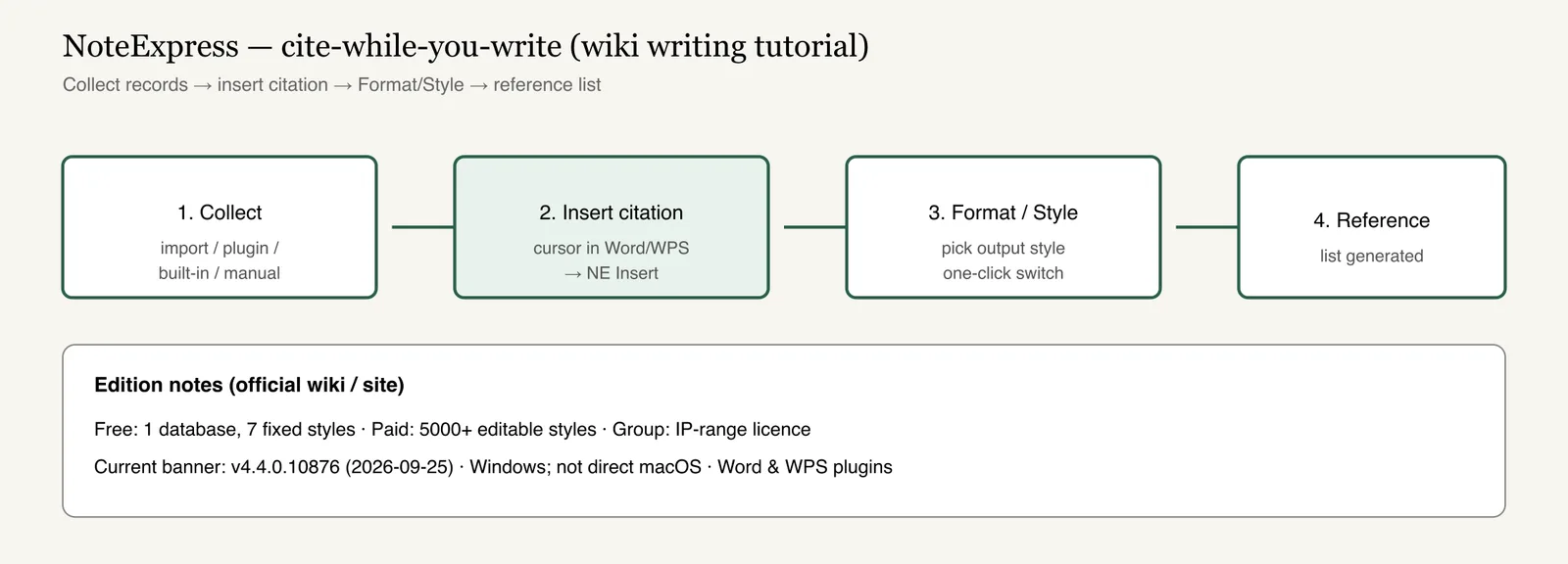
Figure: Schematic of NoteExpress cite-while-you-write. Drawn by this publication, after Writing tutorial[6]
Free, paid personal, and group editions
For cite-and-format, the free build can use the writing plugin, but the wiki states it may create/open only one database and offers seven styles that cannot be added, deleted, or edited.[5] Paid builds lift the database limit, provide 5000+ editable styles, PDF smart update, and batch full-text download.[5] Personal options: free lifelong free-tier use; a registered licence covers two PCs for paid features (username must be an email; multiple copies need multiple emails); VIP unlocks full features for 3/6/12-month terms.[7] Group editions authorise by institutional IP range only; redistribution outside the group is forbidden.[7] The listed price for a permanent personal standard licence is ¥1,980; permanent, VIP, and free users all download the personal standard package, with free users limited to free features after sign-in.[3]
On Windows, cite-while-you-write with NoteExpress: install the personal standard package from the official site, create a database, collect records via file import or the browser capture tool, place the cursor in Word or WPS, insert with Cite / Insert citation, then Format / Style to apply the school or journal style.[1][4][6] If you need editable styles or more than one database, compare free/paid and group-licence notes; the banner version is the current install reference.[1][5][7]
References
-
NoteExpress. Home.
-
NoteExpress. Product.
-
NoteExpress. Buy.
-
NoteExpress wiki. Home.
-
NoteExpress wiki. Paid vs free.
-
NoteExpress wiki. Writing tutorial.
-
NoteExpress wiki. Group vs personal.